
BoxBox Multi-Account Container Manager for Firefox
Multiple accounts. Same website. Fully isolated.
A Firefox extension that lets you create and switch between multiple accounts on the same website. Each account runs in its own container with separate cookies, sessions, and data.
 Get it on Firefox Add-ons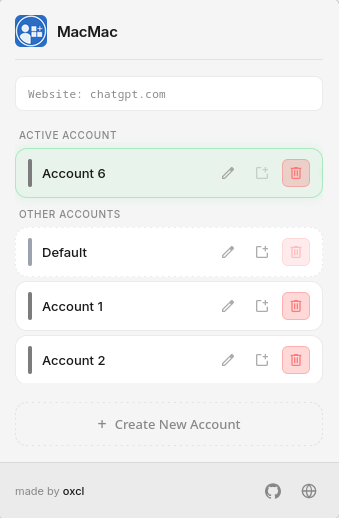
How It Works
How BoxBox manages multiple accounts per website.
The Problem
Juggling multiple accounts on the same website is frustrating. You log out, log back in, lose your place, accidentally post from the wrong account. Browser profiles help but they're heavy and don't share bookmarks or extensions.
Create Accounts
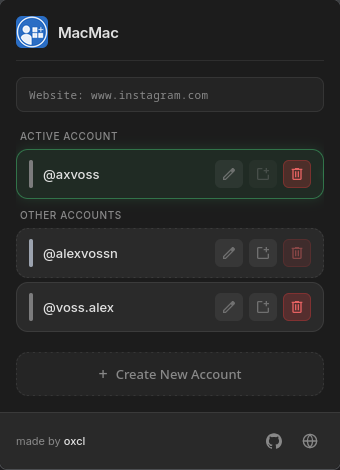
Create multiple accounts for the same website. Each one is backed by its own Firefox Container, keeping cookies, sessions, and data completely isolated from one another.
Automatic Switching
BoxBox remembers which account you used last for each website. When you navigate to a site, it switches to the right container automatically. You just browse.
It Just Works
Once set up, every website opens in the right container. Your accounts stay separate, your sessions stay clean, and you don't have to think about it.
Frequently Asked Questions
How is BoxBox different from Firefox's built-in Container feature?
Firefox's built-in Container feature lets you manually assign tabs to containers. BoxBox builds on that by automatically remembering which container you used last for each website and switching to it — no manual selection required. It also provides a dedicated popup interface for managing all your accounts in one place.
Is my data private? Does BoxBox collect any information?
BoxBox is fully private. All data — your container mappings, preferences, and settings — is stored locally in your browser's storage using the WebExtensions Storage API. BoxBox does not collect, transmit, or share any personal information, browsing history, or usage data. The extension is open source, so you can verify this yourself.
Can I use BoxBox with websites I'm already logged into?
Yes. When you create a new container for a website, it starts with a clean slate — separate cookies, storage, and sessions. You can log into your existing accounts from within the new container without affecting your other sessions. Each container is fully isolated from the others.
Which Firefox versions are supported?
BoxBox requires Firefox 89 or later, as it relies on the contextualIdentities API which is available in these versions. The extension is tested against the latest stable release of Firefox and Firefox Developer Edition.
How do I uninstall BoxBox?
Go to Firefox's Add-ons and Themes page (about:addons), find BoxBox in the Extensions list, and click Remove. Your containers and their data will remain in Firefox, but BoxBox will no longer manage automatic switching for them.
Is BoxBox open source?
Yes. BoxBox is completely open source. You can view the source code, report issues, and contribute on GitHub. The extension is free to use and always will be.
Is BoxBox compatible with Mozilla's Multi-Account Containers extension?
No. BoxBox and Mozilla's Multi-Account Containers take two different approaches to container management and are not compatible. Running both extensions together can introduce conflicts and unexpected behavior.
Try BoxBox
Download BoxBox for Firefox and start managing multiple accounts on any website.
Download for FirefoxSupport BoxBox
BoxBox is free and open source. If you find it useful, consider supporting development with a donation.

Scan to donate
bc1qhngkx9670q2vc4w494yfys3cpx2ykne90tanl7